Cheaper, safer, sorted? 🤞 – How I try to improve my usage of Claude Code
Getting my head around a proper setup for my Claude Code experiments
Unless you have lived under a stone for the last months, you should know that everyone is crazy about Claude Code. But you probably also heard about the problems that arise from its usage. May it be passwords, API-keys etc. that are leaked out, when users give it full-fledged access to their machine. May it be enormous usage of tokens and thus an incredible bill to pay.
Both of these aspects have been reasons why I have been only carefully playing around with Claude Code so far. Both of these things were problems that I wanted to solve partially yesterday by changing my setup. Here is what I did and links with resources to follow. And even more importantly, if you have better suggestions, please let me know in the comments.
1. Virtual Environments:
When I started coding, I did not understand the benefit of virtual environments. Why do I need to set up a virtual computer on a computer and install libraries over and over again? Only after some time, I have learned about breaking changes that lead to some code running with older versions of a library but not with a more recent one. Or having secret passwords only accessible in a certain part of your computer, server etc.
I know that Claude Code by default only sees files in the folder from where I start it. Still, with not being able to understand all the intricacies of it, I just felt that it is safer to also mantle it in a virtual environment, every time I set it up. The way that I do it for now is as follows:
a) I have one dedicated folder for all my Claude Code experiments on my computer that I move to from the terminal.
cd /path/to/your/claude-code-folder
a) I have one dedicated folder for all my Claude Code experiments on my computer that I move to from the terminal.
cd /path/to/your/claude-code-folder
b) I have created the virtual environment (named '.venv') using:
This is only needed the first time around.
python3 -m venv .venv This is only needed the first time around.
c) Activate it using:
d) After I am done with everything, I just end it with:
source .venv/bin/activated) After I am done with everything, I just end it with:
deactivate
Maybe I am wrong, maybe it would be better to do this for each project separately and maybe I will switch to that at some point. But it gives me a safety net for when things go wrong.
2. Github Repos:
This is even more straight-forward. I have a Github repo for each Claude Code project so that I can revert to older versions, if Claude Code is stuck, has developed something that I do not find useful anymore etc. So that I can just revert.
3. Using rtk-Library:
One of the LinkedIn posts of the last weeks that I have saved immediately was this one. RTK is a rust library that specifically reduces the consumption of tokens when Claude Code uses git commands or stuff like npm run .... (I really do not understand anything about Rust, so if there are some wrong explanations, I am sorry) The idea is that RTK is doing summaries and then give the results back to Claude Code, so that it has less context do process. Smarter people have summarized this for instance here.
I just want to say one thing. Make sure that RTK is really hooked up because I have had some troubles with PATH specs etc. Ironically, I asked Claude Code for help to figure out what I had to change.
4. Plan Mode + Claude.md:
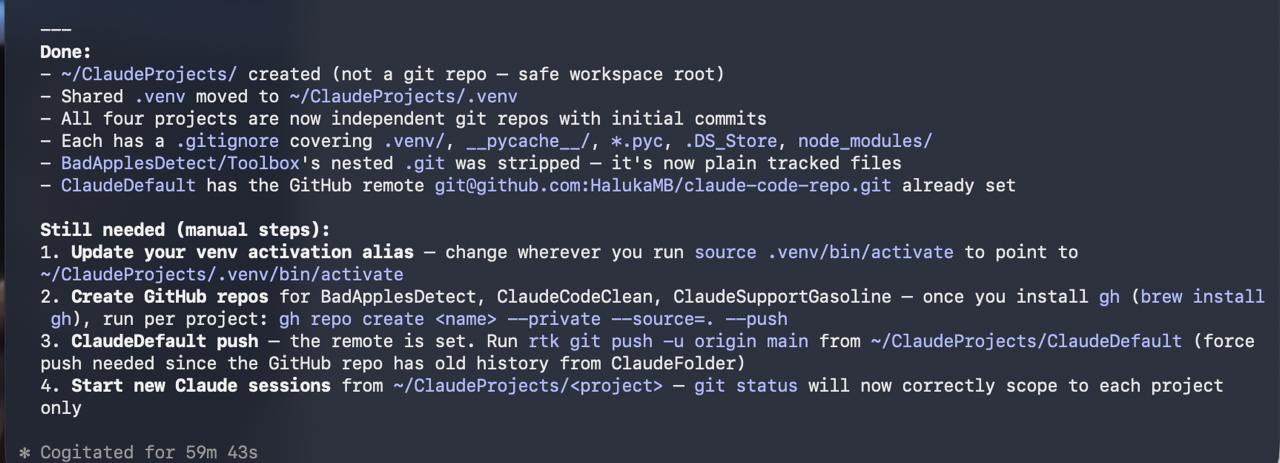
This is definitely one you should have read by now. But I have a Default Folder nested in my Claude Code Experiments-folder. This folder always contains a Claude.md that specifies some basics about what projects should have as a default setting. One of which is that Claude Code should always start with Plane Mode. Because instead of going through some form of developing step-by-step and having to go back three steps just because a process was not thought through, I am forced to really have an idea what I will build and how.
Or summed up by Claude Code, this is my process for now:
Comments 0
No comments yet — be the first.